Employee vacation calendar
Schedule vacations without the clashes
Leavepad's employee vacation calendar puts everyone's time off on one shared schedule. Employees see who's already away before they ask, and managers see the whole team's plans, pending requests included, before they approve the next one.
Get started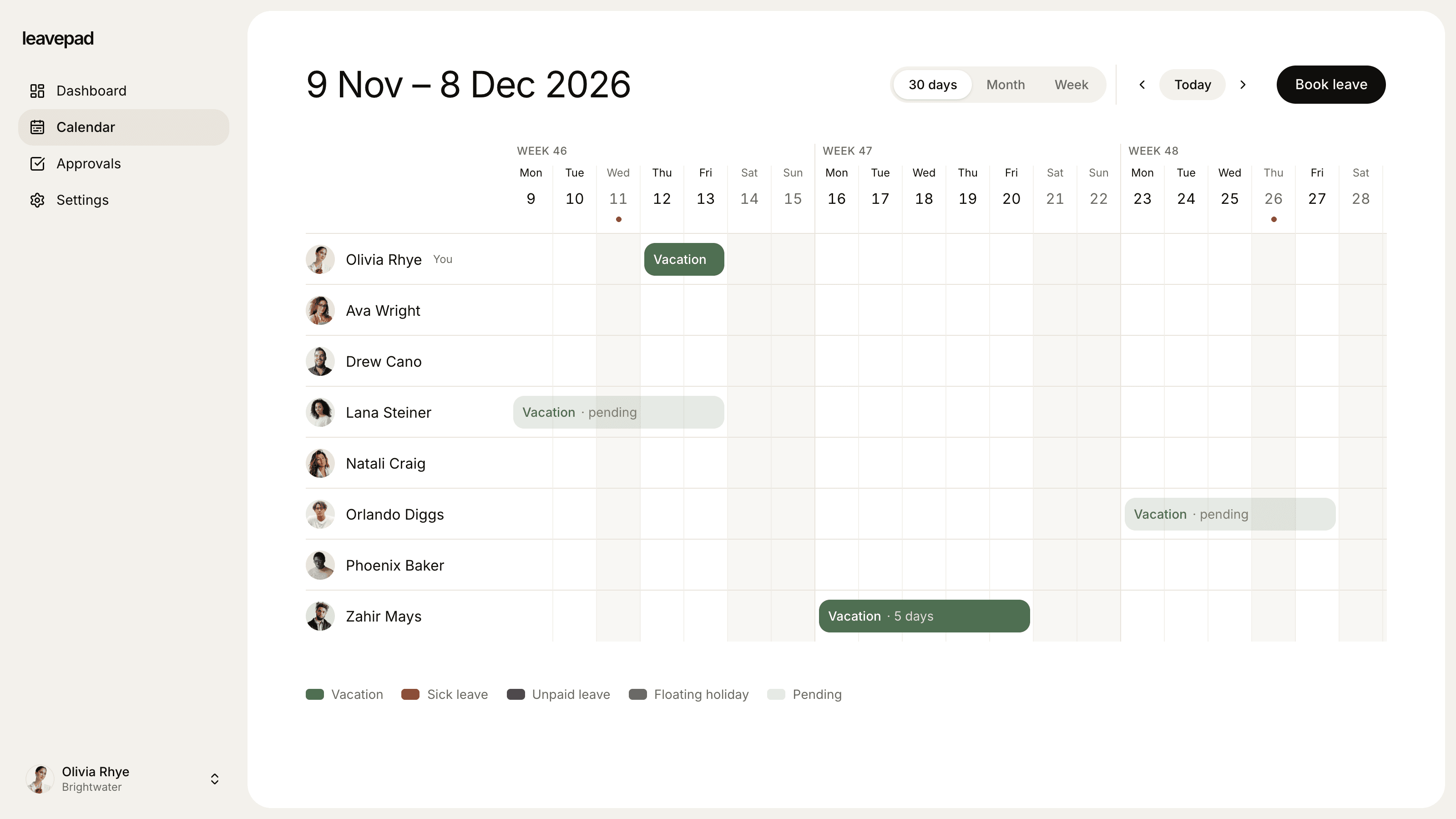
Sound familiar?
Half the team off on July 4th week
Everyone wants the same weeks in summer and around the holidays, and nobody can see who else has asked until it's already approved.
First come, first argued
Without a visible schedule, it's hard to show that peak weeks were handed out fairly, and someone always feels passed over.
A Google Calendar nobody trusts
People add their own vacation events, or forget to, and the shared calendar never matches who's actually approved.
Shared vacation calendar
See who's away before anyone books
Every approved and pending vacation is on the same calendar, colour-coded by type. Before an employee picks dates, they can see who's already off that week, and plan around them instead of finding out later.
- Approved and pending vacation side by side
- Week, month or 30-day view
- Visible to everyone in the company
Vacation scheduling
Approve vacation with the whole schedule in view
When a request comes in for a busy week, the calendar shows who else is off and who's waiting for an answer. Approve in the order requests arrived, or decline with a note suggesting another week.
- Pending requests visible on the calendar
- Approve or decline with a note
- Each request shows the balance left
Company holidays
Holidays on the calendar, not on anyone's balance
Import US federal holidays for the year and add your own company days off. They're marked on the vacation calendar and skipped when vacation is counted, so a week off over July 4th costs four days, not five.
- Federal holidays for any year, in one click
- Add company days, like the day after Thanksgiving
- Never deducted from vacation
More from the employee vacation calendar
Everyone sees the schedule
The whole company sees who's away, and only the leave type. Notes and balances stay private.
Request from the calendar
Employees can send a vacation request from the calendar page, with the team's plans right in front of them.
No double bookings
A request that overlaps time off the person already has is refused, so the calendar never shows duplicates.
Balances behind every request
Each vacation on the calendar comes off a balance, so you see the schedule and the days left together.
Unlimited PTO on the calendar
Running unlimited PTO? Everyone's time off still shows on the calendar, so cover is never a surprise.
Your working week
Set the days you work and your time zone, so the calendar and the day count match your schedule.
What Leavepad replaces
One shared vacation calendar for the whole company, instead of a vacation sign-up sheet, a shared Google Calendar and a lot of guesswork.
- Shared vacation calendarA Google Calendar everyone edits
- Vacation scheduleA sign-up sheet for summer weeks
- Who's off that weekMessaging the team to ask
- Vacation approvalsA yes in a hallway conversation
- Company holidaysAdding them to the calendar every year
- Peak-season fairnessWhoever asked loudest
Guide
How to schedule employee vacations fairly
The weeks everyone wants are the ones that cause arguments. A few clear rules, published before the busy season, make vacation scheduling feel fair, and a shared calendar makes it visible.
- 1
Name your peak weeks early
List the weeks that are always in demand, such as summer, the week of July 4th, Thanksgiving and late December. Ask for requests for those weeks by a set date, say March for summer.
- 2
Choose how ties are settled
Decide what happens when too many people want the same week: first come, first served, rotating priority year to year, or seniority. Write it down, and apply it the same way every time.
- 3
Agree how many can be away at once
Set a simple limit per team for peak weeks, like two people at a time. Managers check the calendar before approving, and decline with a suggested alternative when the week is full.
- 4
Use blackout dates sparingly
If there are times nobody can be off, like a product launch or year-end close, announce them well ahead. Keep the list short, or people stop planning vacation at all.
- 5
Publish the schedule
Put every approved and pending vacation on one calendar the whole company can see. When people can see the schedule, they plan around each other and most clashes never happen.
Free vacation planning tools
Business Days Calculator
Count the working days between two dates, or add business days to a date, skipping weekends and US federal holidays.
Open the calculatorPTO Accrual Calculator
Work out how much paid time off is earned each pay period, and project a PTO balance to any date with caps and carryover.
Open the calculatorPublic Holidays 2027
Every public and bank holiday in 2027 for over 200 countries, with weekdays, regional holidays and long weekends.
See the holidays
Employee vacation calendar: FAQ
What is an employee vacation calendar?
+
An employee vacation calendar shows when each person is on vacation, on one shared schedule. It helps employees choose dates that don't clash and helps managers plan cover. In Leavepad it updates itself with every request and approval.
How do I create a shared vacation calendar for my team?
+
Invite your team to Leavepad and ask everyone to request vacation there. Every request appears on the shared calendar straight away, and turns solid once it's approved. There's nothing to add by hand.
Can employees see each other's vacation?
+
Yes. Everyone in your company can see who's away and when, and the type of leave. Notes, balances and reasons are only visible to the employee, their manager and admins.
Does the vacation calendar show pending requests?
+
Yes. Pending requests appear in a lighter shade, so managers can see what's being asked for and employees can see a week is already in demand.
Can I limit how many people are on vacation at once?
+
Leavepad doesn't block requests by headcount. Instead, managers see who's already off and who's pending right on the calendar, and decline with a note when a week is full. Most teams find a published limit and a visible calendar are enough.
Can employers set vacation blackout dates?
+
In the US, generally yes: employers can restrict when vacation is taken, as long as the rules are applied consistently and don't conflict with protected leave like FMLA or state sick leave. Announce blackout dates early and keep them few.
Does the calendar include company holidays?
+
Yes. Import US federal holidays for any year, add your own company days off, and they're marked on everyone's calendar and skipped when vacation days are counted.
More ways to use Leavepad
Vacation tracker
Vacation requests, balances and a shared team vacation calendar, without the spreadsheet.
Learn moreOut of office calendar
Who's out today: leave, business trips, training and conferences on one team availability calendar.
Learn moreTime off tracker
Vacation, sick days, bereavement and jury duty, each tracked by its own rules.
Learn more
Built for every kind of team
Small businesses
A staff holiday tracker that handles allowances and public holidays without an HR department.
Agencies
Plan project staffing around annual leave and see clashes before a deadline does.
Accounting firms
Keep the team in the office through busy season and spread holidays across the quiet months.
Remote teams
One team leave calendar across time zones, so nobody is surprised by an empty chat channel.
Four-day week companies
Count leave in your working days, not someone else's, with no manual conversions.
Share one vacation calendar
Set up Leavepad for your team in a few minutes. Invite your people and they can book time off today.
Get started