Online holiday wallchart
The holiday wallchart, without the wall
Leavepad turns the office holiday wallchart into one that fills itself in. Every booked holiday, sick day and bank holiday appears on a colour-coded chart the whole team can see, from the office, from home or from a phone.
Get started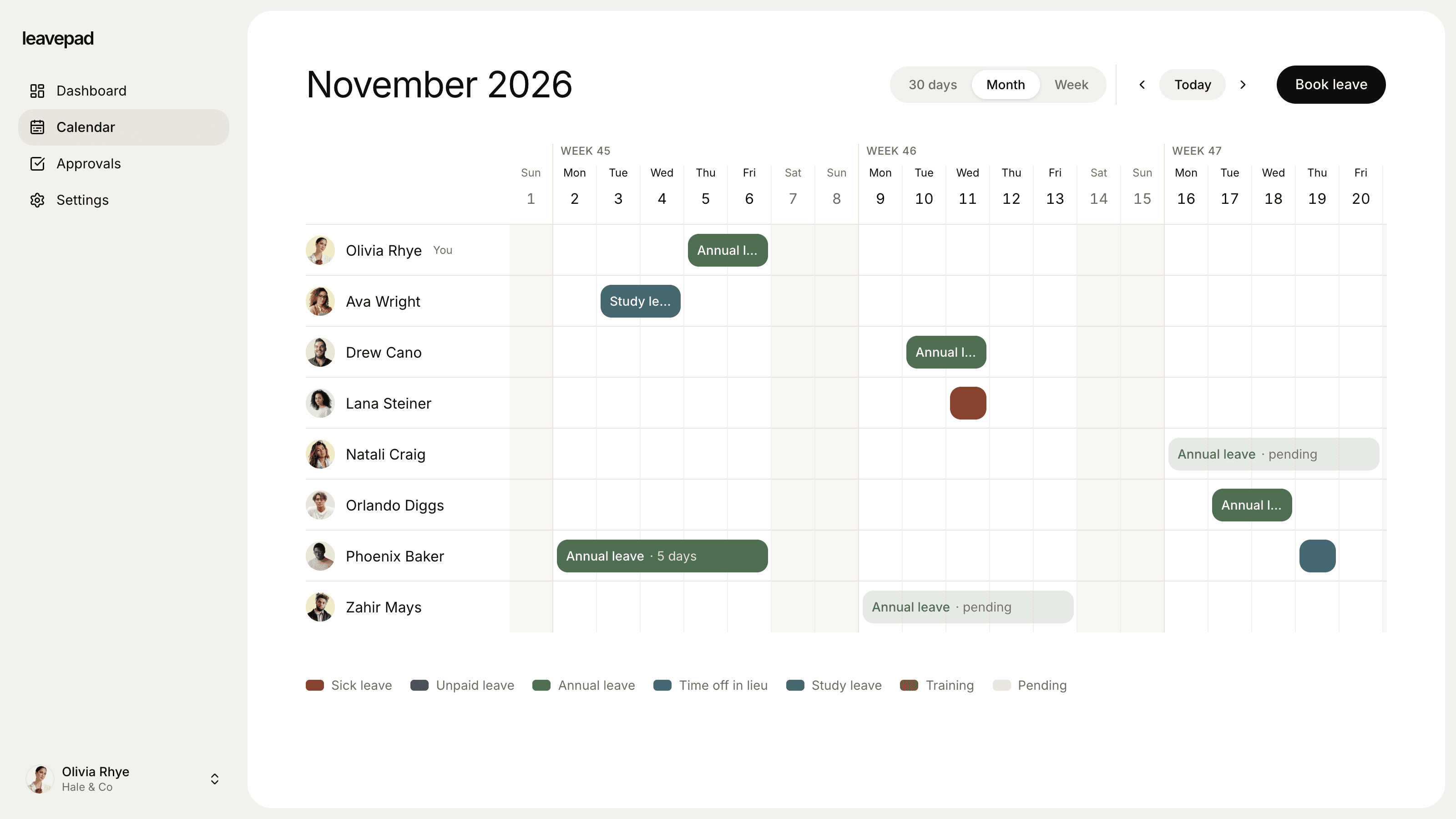
Sound familiar?
Only useful if you're in the office
The wall planner hangs by the kitchen, so anyone working from home books holiday blind and finds out about the clash later.
Out of date by Wednesday
Someone books holiday by email and forgets to write it on the chart, so the chart says one thing and the spreadsheet says another.
A new chart every January
Each year the old one comes down, a new one goes up and every booking for the new year has to be copied across by hand.
Colour-coded
The same colour key, without the pens
Give every leave type its own colour, just like the stickers on a paper wallchart: annual leave in green, sickness in red, TOIL in blue. The colours carry through to every bar on the chart, so the whole month reads at a glance.
- A colour for every leave type
- Pending holiday shown in a lighter shade
- Bank holidays marked on every row
Always current
Fills itself in with every booking
Nobody has to write on the wallchart. Holiday appears the moment it's requested, turns solid when it's approved and disappears if it's cancelled, so the chart is always the same as the record.
- Requests appear straight away
- Approved and pending clearly different
- Cancelled holiday removed automatically
Bank holidays and closures
Bank holidays and closures already on the chart
Import the year's bank holidays in one click and add the days your company closes, like Christmas Eve. They're marked on everyone's row and never counted as holiday.
- Bank holidays imported for any year
- Company closure days added in seconds
- Never deducted from anyone's allowance
What the paper wallchart couldn't do
Visible from anywhere
Office, home or on the road, everyone sees the same chart in their browser.
Week, month or 30 days
Zoom out to see the whole month or the next 30 days, or in to see a single week day by day.
Book from the chart
Request holiday straight from the calendar page, with the whole team's plans in view.
Rolls into next year
No new chart in January. The next year's holiday is already there, and unused days carry over.
Holiday allowances too
Unlike a paper chart, Leavepad also counts how many days each person has used and has left.
Reasons kept private
The chart shows who's away and the leave type. Notes stay between the employee and their manager.
What Leavepad replaces
One online holiday wallchart everyone can see, instead of the laminated wall planner, the dry-wipe pens and the photo of it on someone's phone.
- Online holiday wallchartA laminated wall planner
- Colour-coded leave typesStickers and dry-wipe pens
- Bookings on the chartRemembering to write them up
- Bank holidaysShading them in each January
- Visible to remote staffA photo of the chart in a group chat
- Next year's chartCopying every booking across
Guide
How to replace a paper holiday wallchart
A paper wallchart works because everyone can see it at a glance. Keep that, lose the pens. These steps move you to an online wallchart without losing anything along the way.
- 1
Keep your colour key
Write down the colours your wallchart uses for each kind of leave and use the same ones online. People already know them, so the new chart reads instantly.
- 2
Copy across what's already booked
Add every holiday already on the chart from today onwards, as approved bookings. Leave the past alone unless you need it for balances.
- 3
Mark bank holidays and closures
Import this year's bank holidays and add any days the office closes. They'll show on every row, just as they were shaded on the wall.
- 4
Make the online chart the only chart
Two charts drift apart within a week. Take the paper one down on the day you switch, and ask everyone to book holiday online from then on.
- 5
Put it where people already look
Bookmark the calendar on the office screen or pin it in your team chat, so checking the chart is as easy as walking past the wall.
Free holiday planning tools
Public Holidays 2027
Every public and bank holiday in 2027 for over 200 countries, with weekdays, regional holidays and long weekends.
See the holidaysBusiness Days Calculator
Count the working days between two dates, or add business days to a date, skipping weekends and US federal holidays.
Open the calculatorPro Rata Holiday Calculator
Work out annual leave for part-time staff and for anyone who starts or leaves part-way through the leave year, with rounding and leave owed.
Open the calculator
Online holiday wallchart: FAQ
What is a holiday wallchart?
+
A holiday wallchart is a year or month planner, traditionally on the office wall, with a row for each employee and their holidays marked in colour. An online holiday wallchart does the same job in a browser, and fills itself in from holiday requests.
Is there a free holiday wallchart?
+
Paper wallcharts and spreadsheet templates are cheap, but they need updating by hand and can only be in one place. Leavepad is an online wallchart that updates itself with every booking, and you can try it with your own team.
Can staff see the wallchart from home?
+
Yes. The wallchart is in the browser, so everyone sees the same up-to-date chart wherever they're working, including on a phone.
Can I colour-code the wallchart?
+
Yes. Every leave type has its own colour, chosen from a palette designed to stay readable. Pending requests are shown in a lighter shade of the same colour.
Does the wallchart show bank holidays?
+
Yes. Import bank holidays for the year in one click and add your own closure days. They're marked on the chart and never counted against anyone's holiday allowance.
Can I see a whole month at once?
+
Yes. Switch between a month view, a rolling 30-day view and a week view for the detail.
What happens to the wallchart at the end of the year?
+
Nothing needs doing. The chart simply carries on into the next year, with any holiday already booked for January in place and unused days carried over up to your limit.
More ways to use Leavepad
Team leave calendar
One shared calendar of who's off and when, kept up to date by every approved request.
Learn moreHoliday tracker
Staff holiday booking with bank holidays, pro rata allowances and UK carry-over rules built in.
Learn moreAnnual leave planner
Annual leave allowances, carry-over and bank holidays worked out for you, all year.
Learn more
Built for every kind of team
Small businesses
A staff holiday tracker that handles allowances and public holidays without an HR department.
Agencies
Plan project staffing around annual leave and see clashes before a deadline does.
Accounting firms
Keep the team in the office through busy season and spread holidays across the quiet months.
Remote teams
One team leave calendar across time zones, so nobody is surprised by an empty chat channel.
Four-day week companies
Count leave in your working days, not someone else's, with no manual conversions.
Take the holiday wallchart off the wall
Set up Leavepad for your team in a few minutes. Invite your people and they can book time off today.
Get started