PTO tracker for employees and managers
Time off, requested and approved in one click
Leavepad is the PTO tracker that keeps requests, approvals and balances in one place. Employees ask for time off in seconds, managers approve it from a single list, and every PTO balance updates the moment they do.
Get started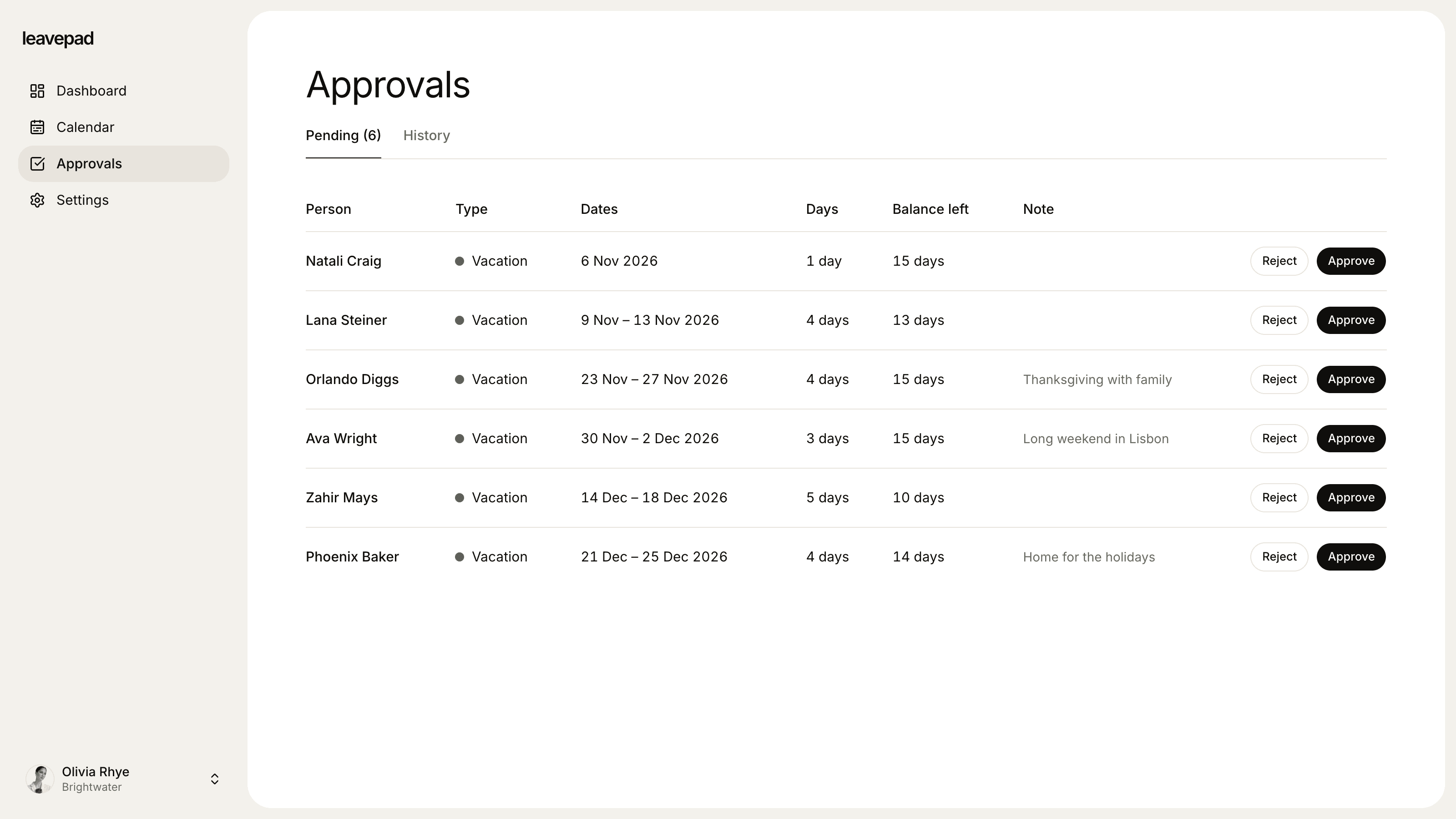
Sound familiar?
Requests scattered everywhere
Time off is asked for in email, chat and in passing, and the one that never got written down is the one that clashes.
Approvals stuck in an inbox
A request waits for days because the manager missed it, and the employee can't book their flights until they hear back.
Balances nobody can trust
The PTO spreadsheet is a week behind, so every "how much do I have left?" turns into a recount.
Time off requests
A PTO request takes seconds
Employees pick a leave type and dates, add a note if they like, and send. Leavepad counts only the working days in the request, so a week off costs five days of PTO, not seven.
- Request time off from any device
- Weekends and public holidays are never counted
- Requests that overlap existing time off are refused
PTO approvals
Every pending request in one list
Requests go straight to the employee's manager. Each one shows the dates, the days requested and the balance left, so approving or rejecting it with a note takes one click.
- Managers approve their own team, admins approve anyone
- See the remaining balance before you decide
- Choose which leave types need approval at all
PTO policy
Track every kind of time off its own way
Keep vacation, sick days and floating holidays as separate leave types, or run one PTO bank for everything. Each type has its own allowance, colour, carry-over limit and approval rule.
- As many leave types as your policy needs
- Set an allowance in days, or no limit at all
- Auto-approve the types that don't need a manager
Everything else your PTO tracker needs
Team calendar
Approved and pending time off on one shared calendar, so people can plan around each other.
Public holidays built in
Import your country's holidays in one click. They're shown on the calendar and never taken from anyone's PTO.
Unlimited PTO, tracked too
Give a leave type no limit and still see who's off and how much time people actually take.
Book time off for others
Admins and managers can log PTO or a sick day on someone's behalf. It's approved straight away.
Custom allowances
Adjust any person's balance for part-time hours, tenure or days agreed in their offer letter.
Roles that fit your team
Employees, managers and admins each see what they need, and nothing they shouldn't.
What Leavepad replaces
One PTO tracker for the whole company, instead of the spreadsheets, emails and chat threads you use today.
- PTO requestsEmails, chat messages and sticky notes
- PTO approvalsChasing managers for a reply
- PTO balancesThe PTO tracker spreadsheet
- Sick day recordsA note in someone's calendar
- Who's offAsking around before you book
- Year-end carry-overRecounting every row by hand
Guide
How to track PTO for your employees
Good PTO tracking is less about the tool and more about a few clear rules that everyone follows. Set these up once and the day-to-day takes care of itself.
- 1
Write down your PTO policy
Say how much PTO people get, whether it's granted up front or accrues each pay period, when the PTO year starts, how much notice you need and who approves requests.
- 2
Decide on one bank or separate types
A single PTO bank is simple: vacation, sick and personal days all come from one balance. Separate types give you clearer records. Either way, write down which days count.
- 3
Route every request through one place
Requests that arrive by chat or in the hallway never make it into the balance. One request form or tool means every day off has a record and an approval.
- 4
Count working days only
Deduct only the days someone would have worked. Weekends and paid holidays shouldn't come out of their PTO, and part-time staff should be counted on their own schedule.
- 5
Check balances and carry-over at year end
Apply your carry-over cap and remind people with a lot left to book it. Check your state's rules first: some, such as California, treat earned PTO as wages that can't be forfeited.
Free PTO calculators
PTO Accrual Calculator
Work out how much paid time off is earned each pay period, and project a PTO balance to any date with caps and carryover.
Open the calculatorPTO Payout Calculator
Work out what unused vacation is worth when an employee leaves, from an hourly rate or salary, with estimated taxes.
Open the calculatorBusiness Days Calculator
Count the working days between two dates, or add business days to a date, skipping weekends and US federal holidays.
Open the calculator
PTO tracker for employees and managers: FAQ
What is a PTO tracker?
+
A PTO tracker records how much paid time off each employee has, the time off they request and take, and what's left. A spreadsheet can do the counting, but PTO tracking software like Leavepad also handles requests, approvals and a shared calendar, so balances update on their own.
How do I track PTO for employees?
+
Give each employee a PTO allowance, ask them to request time off in one place, and deduct only the working days in each approved request. Leavepad does the counting, keeps a record of every approval and shows everyone their balance.
Does Leavepad accrue PTO each pay period?
+
Leavepad gives each person their full yearly allowance at the start of the leave year. If your policy accrues PTO, you can work out each person's accrued balance with our free PTO accrual calculator and adjust their balance to match.
Can managers approve PTO requests?
+
Yes. Managers approve or reject requests from their direct reports, admins can approve anyone, and both can add a note. You decide per leave type whether requests need approval at all.
Can we track sick days and PTO separately?
+
Yes. Create a leave type for each kind of time off, each with its own allowance (or no limit) and approval rule. Or use a single PTO type if your policy combines them.
Does Leavepad work for unlimited PTO?
+
Yes. Give the leave type no limit. Requests, approvals and the team calendar work the same way, and you can still see how much time each person takes.
Can we replace our PTO spreadsheet?
+
Yes. Set your allowances, invite your team, then adjust each person's balance to match what they have left this year. From then on every approved request updates it automatically.
More ways to use Leavepad
Vacation tracker
Vacation requests, balances and a shared team vacation calendar, without the spreadsheet.
Learn moreAnnual leave planner
Annual leave allowances, carry-over and bank holidays worked out for you, all year.
Learn moreTeam leave calendar
One shared calendar of who's off and when, kept up to date by every approved request.
Learn more
Built for every kind of team
Small businesses
A staff holiday tracker that handles allowances and public holidays without an HR department.
Agencies
Plan project staffing around annual leave and see clashes before a deadline does.
Accounting firms
Keep the team in the office through busy season and spread holidays across the quiet months.
Remote teams
One team leave calendar across time zones, so nobody is surprised by an empty chat channel.
Four-day week companies
Count leave in your working days, not someone else's, with no manual conversions.
Retire the PTO spreadsheet
Set up Leavepad for your team in a few minutes. Invite your people and they can book time off today.
Get started