Vacation tracker for employees and teams
Every vacation day, accounted for
Leavepad is the vacation tracker your team will actually use. People request vacation in seconds, managers approve it in one click, and balances and the team vacation calendar update on their own. No spreadsheet to keep up to date.
Get started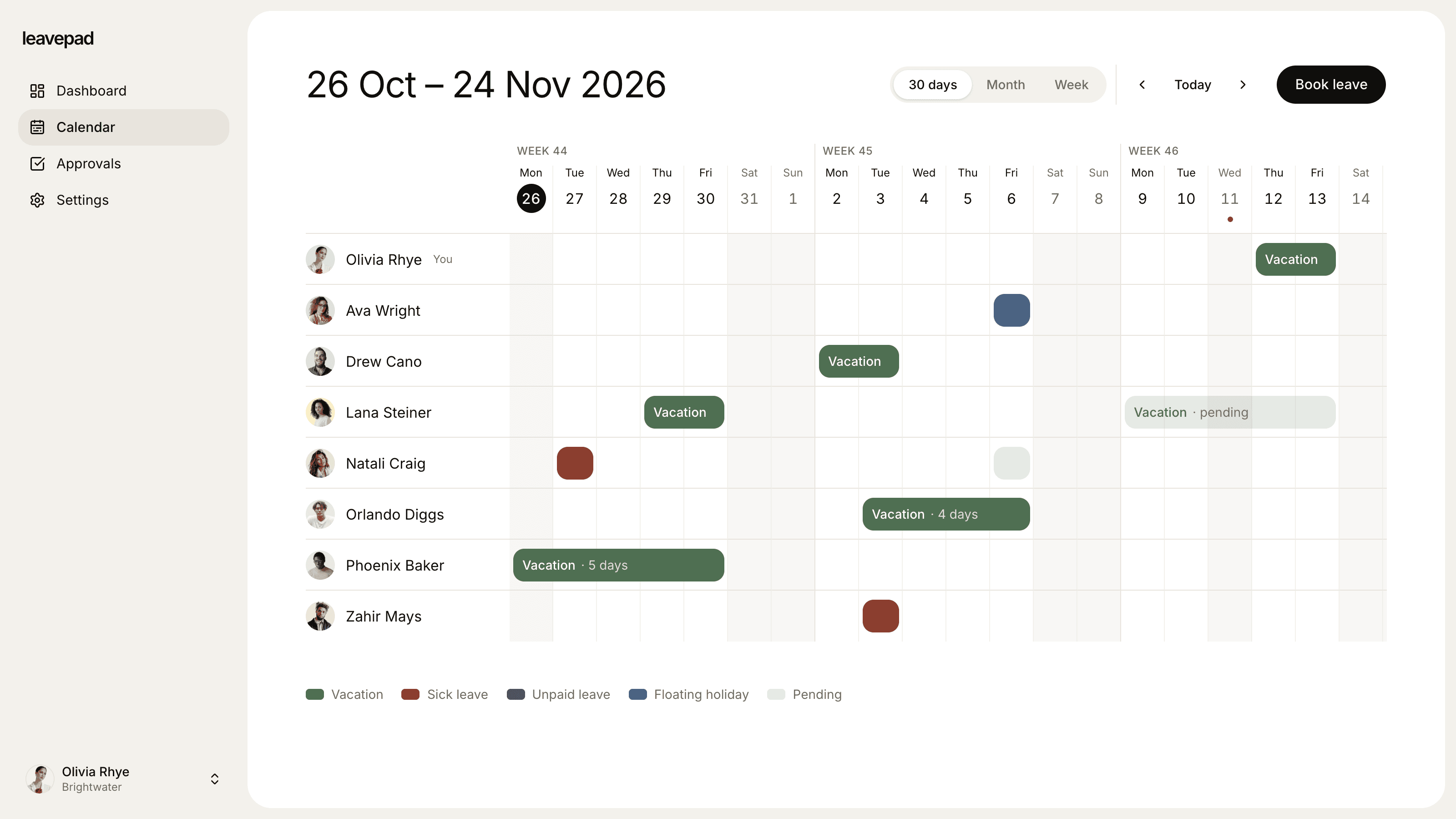
Sound familiar?
A vacation spreadsheet nobody trusts
Someone forgot to add last week's days off, a formula broke in March, and now every balance is a guess.
Everyone away the same week
Two people book the same week in August because neither could see the other's plans until it was too late.
"How many days do I have left?"
Every answer means opening the spreadsheet, counting approved days by hand and hoping nothing was missed.
Vacation days tracker
Vacation balances that keep themselves up to date
Set a yearly vacation allowance and Leavepad tracks the rest. Every approved request comes off the right balance, counting only working days, and each employee can see exactly how many vacation days they have left.
- Vacation, sick leave and other PTO tracked separately
- Weekends and public holidays are never counted
- Employees check their own balance, any time
Vacation request system
Vacation requests approved in one click
Employees pick their dates and send a vacation request from any device. It goes straight to their manager, who approves or declines it with a note, and the balance and calendar update the moment they do.
- Requests go to the right manager automatically
- Approve or decline with a note in one click
- Turn approval off for leave types that don't need it
Holiday calendar
Public holidays never come out of vacation
Import your country's public holidays for the year in one click, then add your own company days off. They show on the team vacation calendar and are skipped when vacation days are counted, so a week off over a holiday costs four days, not five.
- National holidays for any year, in one click
- Add company days off, like Christmas Eve
- Holidays shown on the team vacation calendar
Everything else your vacation tracker needs
Team vacation calendar
Everyone's vacation on one shared calendar, so people can see who's away before they book and managers can plan cover.
Carry-over of unused vacation
Set a carry-over limit and unused vacation days roll into the new year on their own, up to that limit.
Unlimited PTO, tracked too
Run unlimited vacation as a leave type with no limit. Requests, approvals and the calendar work just the same.
Custom allowances
Adjust any person's vacation balance for part-time hours, long service or days agreed in their contract.
Log vacation for anyone
Admins can book vacation on someone's behalf, so staff who rarely log in still have a complete record.
Your working week and time zone
Set the days your company works and its time zone, so every vacation request counts the right days.
What Leavepad replaces
One vacation tracker for the whole team, instead of the spreadsheets, emails and wall planners you use today.
- Vacation requestsEmails, texts and sticky notes
- Vacation approvalsWaiting on a reply in someone's inbox
- Vacation balancesThe vacation tracker spreadsheet
- Team vacation calendarA wall planner nobody updates
- Public holidaysLooking up this year's dates
- Year-end carry-overRecounting every row by hand
Guide
How to track employee vacation time
Whether you use software or a spreadsheet, tracking vacation well comes down to the same few decisions. Make them once, write them down, and the day-to-day tracking gets easy.
- 1
Decide how vacation is earned
Either give everyone their full allowance at the start of the vacation year, or let it accrue a little each pay period. Write down when the vacation year starts and how you prorate it for new starters.
- 2
Track in days, by leave type
Keep vacation separate from sick leave and other time off, so each balance means something. Count only working days, so a week off is five days, not seven, and public holidays aren't deducted.
- 3
Put every request in one place
Requests made in passing, by text or by email are the ones that never reach the tracker. Ask everyone to use one form or tool, so approvals and balances can't drift apart.
- 4
Share one vacation calendar
Let everyone see who's already off before they book. Agree any rules for busy periods, such as how many people can be away at once, and how much notice you need for longer trips.
- 5
Review balances before the year ends
A couple of months before year end, nudge people with lots of days left to book them, and apply your carry-over limit. Check local rules first: some US states, such as California, don't allow use-it-or-lose-it vacation policies.
Free vacation and PTO calculators
PTO Accrual Calculator
Work out how much paid time off is earned each pay period, and project a PTO balance to any date with caps and carryover.
Open the calculatorBusiness Days Calculator
Count the working days between two dates, or add business days to a date, skipping weekends and US federal holidays.
Open the calculatorPTO Payout Calculator
Work out what unused vacation is worth when an employee leaves, from an hourly rate or salary, with estimated taxes.
Open the calculator
Vacation tracker for employees and teams: FAQ
What is a vacation tracker?
+
A vacation tracker records how much vacation each employee is entitled to, what they've requested and taken, and how much is left. The simplest ones are spreadsheets. Vacation tracking software like Leavepad also handles requests, approvals and a shared team calendar, so balances update themselves with every approved request.
How do I track employee vacation time?
+
Set a yearly vacation allowance for each employee, ask everyone to request time off in one place, and deduct only the working days in each approved request. A shared calendar of who's off helps people plan around each other. Leavepad does each of these steps for you.
Is a vacation tracker spreadsheet good enough?
+
For a handful of people it can be. As the team grows, spreadsheets start to fail: requests arrive outside them, formulas break, there's no record of who approved what, and year-end carry-over has to be worked out by hand. A dedicated vacation tracker keeps requests, approvals, balances and the calendar in sync.
What's the difference between vacation and PTO?
+
Vacation is time off for rest and travel. PTO (paid time off) often combines vacation, sick days and personal days into a single bank of hours or days. Leavepad handles both: track vacation and sick leave as separate leave types, or use one PTO type for everything.
How many vacation days do employees get in the US?
+
There is no federal law requiring paid vacation in the US, so it is set by the employer. Bureau of Labor Statistics data puts the average for private-sector workers at around 11 paid vacation days after one year of service, rising with tenure. Some states and cities require paid sick leave, which is separate.
Does the vacation tracker count weekends and public holidays?
+
No. Leavepad only counts the working days in your company's working week, and skips the public holidays you've imported. A Monday to Friday trip over a public holiday costs four vacation days, not five.
Can Leavepad track unlimited vacation?
+
Yes. Create a vacation leave type with no limit. Requests, approvals and the team calendar work the same way, so you still know who's away and can see how much time people actually take.
Can employees see who else is on vacation?
+
Yes. The team calendar shows everyone's time off alongside public holidays, so people can check who's away before they book and managers can plan cover.
More ways to use Leavepad
PTO tracker
Time off requests, one-click approvals and PTO balances that update themselves.
Learn moreAnnual leave planner
Annual leave allowances, carry-over and bank holidays worked out for you, all year.
Learn moreTeam leave calendar
One shared calendar of who's off and when, kept up to date by every approved request.
Learn more
Built for every kind of team
Small businesses
A staff holiday tracker that handles allowances and public holidays without an HR department.
Agencies
Plan project staffing around annual leave and see clashes before a deadline does.
Accounting firms
Keep the team in the office through busy season and spread holidays across the quiet months.
Remote teams
One team leave calendar across time zones, so nobody is surprised by an empty chat channel.
Four-day week companies
Count leave in your working days, not someone else's, with no manual conversions.
Retire the vacation spreadsheet
Set up Leavepad for your team in a few minutes. Invite your people and they can book time off today.
Get started