Annual leave planner for teams
Plan the year's leave, not the spreadsheet
Leavepad is the annual leave planner that keeps every allowance up to date. Set what each person gets, and Leavepad tracks what's booked, what's left and what carries over, with bank holidays already in the plan.
Get started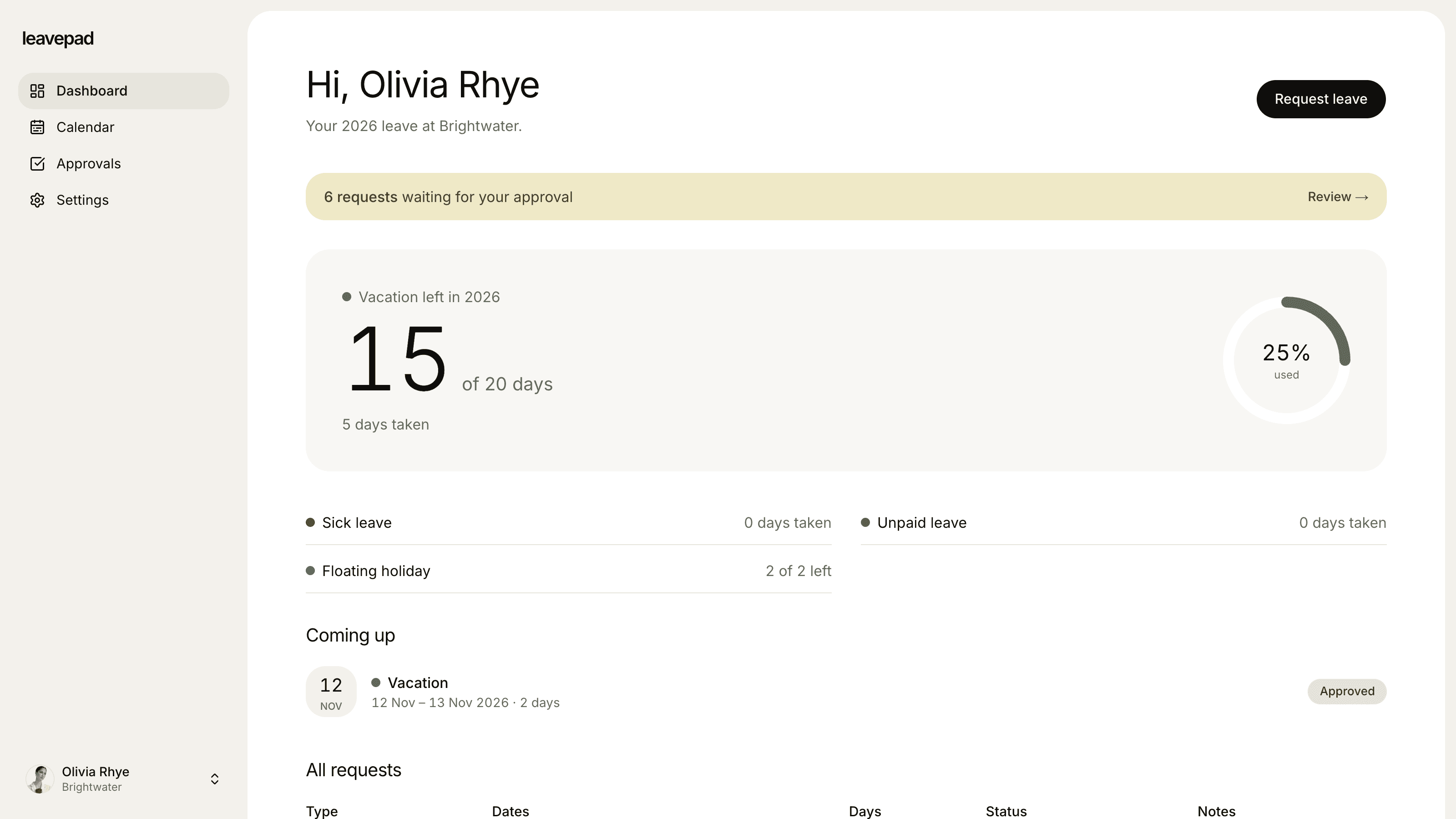
Sound familiar?
Allowances worked out by hand
Every new starter, part-timer and long-service day means another formula in a spreadsheet only one person understands.
A year-end scramble
In December half the team has days left, the other half has none, and nobody agreed what carries over.
A wall chart that's always out of date
Leave booked by email never makes it onto the chart, so clashes only show up when two people are already away.
Annual leave tracker
Every allowance, always up to date
Set a yearly allowance for each leave type and Leavepad keeps track from there. Approved leave comes off the right balance, counting only working days, and everyone can see exactly what they have left.
- Separate balances for annual leave, sickness and more
- Only working days are counted
- Requests can't go over what's left
Carry-over
Carry-over that works itself out
Set how many unused days can roll into the new year for each leave type. When the year turns over, Leavepad carries each person's unused days across, up to that limit, so the new year starts from the right number.
- A carry-over limit per leave type
- Unused days roll over automatically
- Turn carry-over off for the whole company in one switch
Bank holidays
Bank holidays in the plan from day one
Import your country's bank holidays for the year in one click, then add your own company days off. They're shown on the calendar and never taken from anyone's annual leave.
- Bank holidays for any year, in one click
- Add company days off, like the Christmas shutdown
- Remove any day that doesn't apply to you
Everything else in the annual leave planner
Team leave calendar
See everyone's leave by week, month or the next 30 days, so people plan around each other.
Part-time and pro-rata allowances
Adjust any person's balance for part-time hours, a mid-year start or extra days for long service.
Your leave types
Annual leave, sickness, parental, study or unpaid leave, each with its own allowance and rules.
One-click approvals
Requests go to the right manager, who sees the balance left before approving.
Book leave for others
Add leave for staff who rarely log in. It's approved straight away and comes off their balance.
No double booking
A request that overlaps leave someone has already booked is refused before it's saved.
What Leavepad replaces
One annual leave planner for the whole team, instead of the wall chart, the spreadsheet and the year-end maths.
- Annual leave allowancesA spreadsheet of formulas
- Leave requestsPaper forms and emails
- Who's off and whenThe wall chart in the office
- Bank holidaysLooking up this year's dates
- Carry-overYear-end maths by hand
- Pro-rata allowancesA calculator and a guess
Guide
How to plan annual leave for your team
A good annual leave plan spreads time off across the year, keeps the team covered and leaves nobody with a pile of days in December. These steps work for any size of team.
- 1
Set each person's allowance
Start from the legal minimum where you are and add anything extra you offer. In the UK most full-time workers get 5.6 weeks, which is 28 days and can include bank holidays. Pro-rata it for part-timers and mid-year starters.
- 2
Agree the rules up front
Decide how much notice people should give, how many can be off at once and whether any weeks are off limits, like a busy season or year end. Write it down where everyone can see it.
- 3
Put bank holidays and shutdowns in first
Add bank holidays and any company-wide days off before people book, so nobody plans around a day that's already off.
- 4
Share one calendar of who's off
When everyone can see the plan, people book around each other and you rarely have to say no to a clash.
- 5
Check balances every quarter
Nudge people who haven't booked much, and agree how much can carry over well before the year ends, so leave is spread out instead of bunched up in December.
Free annual leave calculators
Holiday Entitlement Calculator
Work out UK statutory annual leave for full-time, part-time and irregular-hours workers, including part-year starters, extra company leave and bank holidays.
Open the calculatorPro Rata Holiday Calculator
Work out annual leave for part-time staff and for anyone who starts or leaves part-way through the leave year, with rounding and leave owed.
Open the calculatorPublic Holidays 2027
Every public and bank holiday in 2027 for over 200 countries, with weekdays, regional holidays and long weekends.
See the holidays
Annual leave planner for teams: FAQ
What is an annual leave planner?
+
An annual leave planner shows each person's leave allowance, the leave they've booked and what's left, alongside a calendar of who's off. Leavepad keeps it up to date automatically as requests are approved, instead of you updating a spreadsheet or wall chart.
How much annual leave are employees entitled to in the UK?
+
Most workers are entitled to 5.6 weeks of paid holiday a year. For someone working five days a week that's 28 days, which can include the 8 bank holidays. Part-time workers get the same 5.6 weeks, pro-rated to the days they work. Our free holiday entitlement calculator works it out for any working pattern.
Can unused annual leave be carried over?
+
It depends on the country and the contract. In the UK, the 4 weeks of leave that come from EU law generally have to be taken in the leave year, except in cases such as long-term sickness or family leave, while the extra 1.6 weeks can be carried over if the contract allows. In Leavepad you set a carry-over limit per leave type and unused days roll over automatically.
How do I work out pro-rata annual leave?
+
Multiply the full-time allowance by the share of a full-time week someone works, and by the share of the leave year they're employed. Our free pro-rata holiday calculator does this for you, and in Leavepad you can then adjust that person's balance to match.
Does Leavepad include bank holidays?
+
Yes. Import your country's public holidays for any year in one click, then add or remove days to suit your company. They show on the team calendar and are never counted against anyone's annual leave.
Can I see everyone's remaining annual leave?
+
Admins can see every person's balances. Managers see the balance left on each request they approve, and each employee sees their own balances on their dashboard.
Is there a free annual leave planner template?
+
A spreadsheet template works for a small team, but it relies on someone updating it by hand. Leavepad updates allowances, carry-over and the calendar as leave is approved, and takes a few minutes to set up.
More ways to use Leavepad
PTO tracker
Time off requests, one-click approvals and PTO balances that update themselves.
Learn moreVacation tracker
Vacation requests, balances and a shared team vacation calendar, without the spreadsheet.
Learn moreTeam leave calendar
One shared calendar of who's off and when, kept up to date by every approved request.
Learn more
Built for every kind of team
Small businesses
A staff holiday tracker that handles allowances and public holidays without an HR department.
Agencies
Plan project staffing around annual leave and see clashes before a deadline does.
Accounting firms
Keep the team in the office through busy season and spread holidays across the quiet months.
Remote teams
One team leave calendar across time zones, so nobody is surprised by an empty chat channel.
Four-day week companies
Count leave in your working days, not someone else's, with no manual conversions.
Plan the year's leave in minutes
Set up Leavepad for your team in a few minutes. Invite your people and they can book time off today.
Get started