Absence management software
Every absence recorded, the day it happens
Leavepad is absence management software for teams that need an accurate record without a heavy HR system. Log sickness, medical appointments, bereavement and family leave on the day they happen, keep the details private, and see everyone who's absent on one calendar.
Get started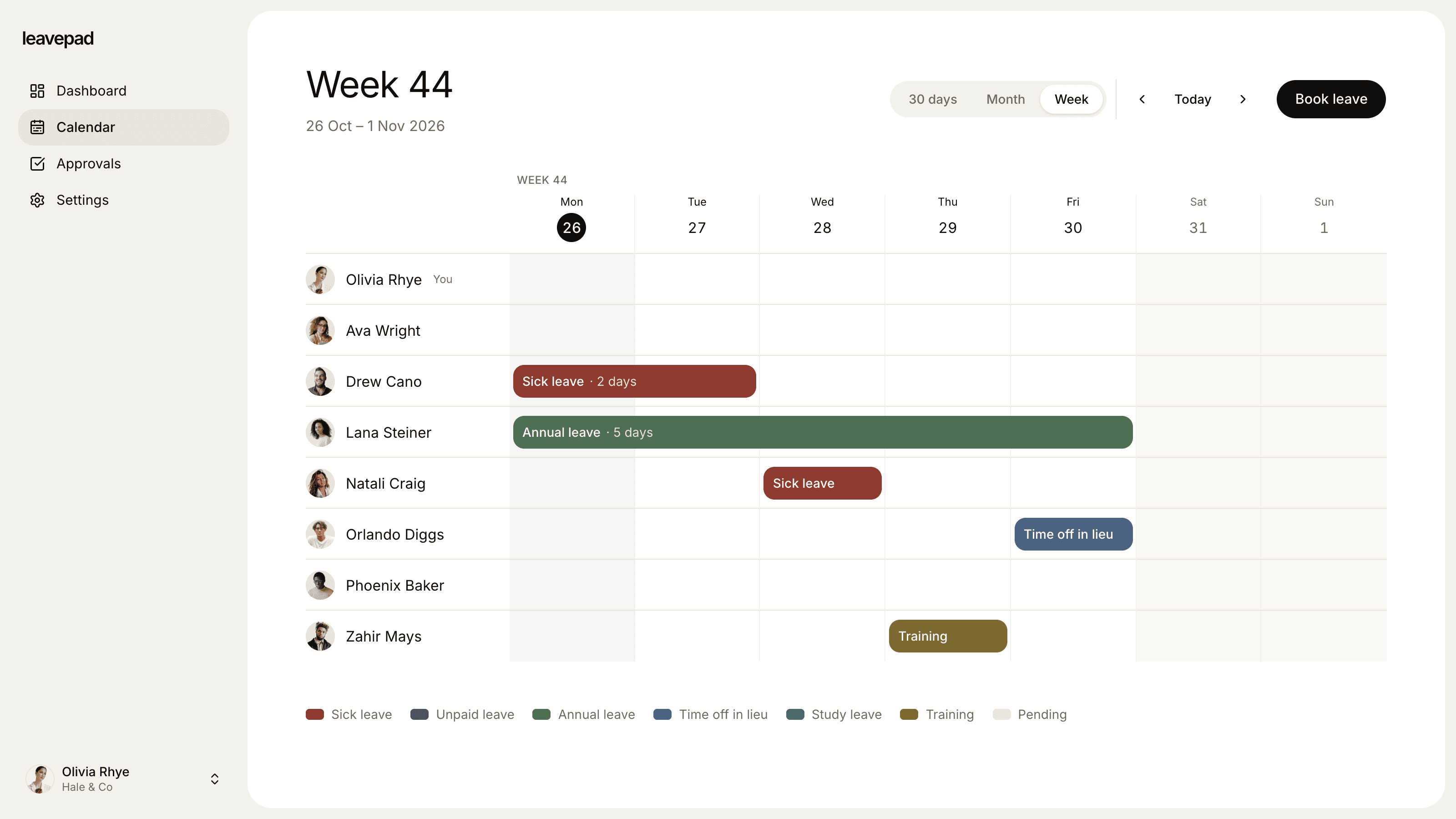
Sound familiar?
Sick days that never get logged
Someone texts their manager at 7am, the day is never written down, and the absence record is wrong from then on.
No pattern until it's a problem
Short, frequent absences are hard to spot when they're scattered across emails, and harder to talk about without a record.
Sensitive notes in the wrong place
Reasons for sickness sit in a shared spreadsheet or a group chat, visible to people who have no reason to see them.
Sickness absence
Log a sick day in seconds, for anyone
When someone calls in sick, their manager records it straight away, on their behalf. It's approved automatically, shows on the team calendar and is added to the person's absence record, so nothing depends on remembering later.
- Managers log absence for their direct reports
- Admins can log absence for anyone
- Recorded and approved straight away
Absence types
Every kind of absence, recorded separately
Create an absence type for each reason you need to report on: sickness, medical appointments, bereavement, parental leave or unpaid leave. Each has its own allowance or no limit, and its own approval rule.
- Separate records for each absence type
- No limit on sickness, so every day is recorded
- Approval only where your policy needs it
Absence calendar
See who's absent today, and plan around it
The team calendar shows every absence alongside holiday, so managers can see at a glance who's off today and who's due back. Colleagues see that someone is away, never the reason why.
- By week or by month
- Absence and holiday on one calendar
- Notes and reasons stay private
More from the absence management software
A note on every absence
Add a short note to a request or decision, such as when a fit note is due, visible only to the right people.
Private by default
Notes and balances are only visible to the employee, their manager and admins. The calendar shows only who's away.
Bradford Factor, free
Use our free Bradford Factor calculator to spot frequent short absences from the record Leavepad keeps.
Absence rate, free
Work out your team's absence rate from the days recorded, and compare it month by month.
Holiday in the same place
Holiday and absence share one calendar and one record, so nobody has to check two systems.
Data kept separate
Each company's absence records are isolated in the database, and only your team can see them.
What Leavepad replaces
One absence management system for sickness, appointments and family leave, instead of a sickness log, a holiday sheet and a pile of emails.
- Sickness recordsA text message to your manager
- Absence logA spreadsheet tab nobody updates
- Who's absent todayAsking around at 9am
- Medical appointmentsA note in someone's diary
- Private absence notesA group chat everyone can read
- Absence patternsA hunch
Guide
How to manage staff absence fairly
Good absence management is mostly about consistency: the same process for everyone, recorded the same way. These steps cover the basics for UK employers, and most of them apply anywhere.
- 1
Write an absence policy
Say how and by when staff should report an absence, who they tell, when they need a fit note and how absence is paid. In the UK, staff can self-certify for the first seven days of sickness, and need a fit note after that.
- 2
Record every absence on the day
Log each absence as soon as it's reported, with its type and dates. A complete record is what makes every later step fair. From 6 April 2026, Statutory Sick Pay is paid from the first day of sickness, so first days matter more than ever.
- 3
Hold a short return-to-work chat
When someone comes back, check they're well enough to work and whether they need any support or adjustments. Keep it brief and friendly, and note anything agreed.
- 4
Use trigger points, applied to everyone
Many employers use the Bradford Factor (S² × D, where S is the number of spells and D the total days) to flag frequent short absences for a conversation. Use it as a prompt to talk, not as an automatic warning.
- 5
Review absence regularly
Look at your absence rate every month or quarter. A rise across a team can point to workload or wellbeing problems that are worth fixing early.
Free absence calculators
Bradford Factor Calculator
Score an employee's sickness absence with the Bradford factor, from spells and days off or from absence dates over a rolling 52 weeks.
Open the calculatorAbsence Rate Calculator
Work out your team's absenteeism rate, the days lost per employee and the pay cost of unplanned absence, by days or hours.
Open the calculatorMaternity Leave Calculator
Work out UK maternity leave dates, when to tell your employer and how much Statutory Maternity Pay you could get, with 2026/27 rates.
Open the calculator
Absence management software: FAQ
What is absence management software?
+
Absence management software records when employees are away from work and why: sickness, appointments, bereavement, family leave and holiday. It replaces spreadsheets and emails with one accurate record, a shared calendar of who's away and clear approval rules.
How do I record staff sickness?
+
Log each sick day as soon as it's reported, with its dates, under a sickness absence type. In Leavepad, managers can record sickness for their direct reports and it's approved straight away, so the record is complete even if the employee never logs in.
Who can see why someone is absent?
+
Only the employee, their manager and admins can see notes and absence balances. Everyone else sees only that the person is away on the team calendar.
Does Leavepad calculate the Bradford Factor?
+
Not inside the app yet. Leavepad keeps the absence record, and our free Bradford Factor calculator works out the score from the number of spells and days. Our free absence rate calculator does the same for your team's absence rate.
What is a good absence rate?
+
It depends on your sector, but the CIPD's 2023 survey found UK employees were absent an average of 7.8 days a year, which is an absence rate of about 3.4%. Compare your own rate over time rather than against a single benchmark.
Can I track absence and holiday together?
+
Yes. Holiday and every kind of absence are leave types in the same system, on the same calendar, with their own balances. Holiday can need approval while sickness doesn't.
What changed with Statutory Sick Pay in 2026?
+
From 6 April 2026, SSP is paid from the first day of sickness instead of the fourth, and the lower earnings limit has been removed, so all employees are eligible. Accurate first-day records now affect pay, not just reporting.
More ways to use Leavepad
Holiday tracker
Staff holiday booking with bank holidays, pro rata allowances and UK carry-over rules built in.
Learn moreLeave management system
Leave policies, approvals, balances and the team calendar in one leave management system.
Learn moreTeam leave calendar
One shared calendar of who's off and when, kept up to date by every approved request.
Learn more
Built for every kind of team
Small businesses
A staff holiday tracker that handles allowances and public holidays without an HR department.
Agencies
Plan project staffing around annual leave and see clashes before a deadline does.
Accounting firms
Keep the team in the office through busy season and spread holidays across the quiet months.
Remote teams
One team leave calendar across time zones, so nobody is surprised by an empty chat channel.
Four-day week companies
Count leave in your working days, not someone else's, with no manual conversions.
Start recording absence properly
Set up Leavepad for your team in a few minutes. Invite your people and they can book time off today.
Get started