Out of office calendar
Who's out today, and who's back tomorrow
An out of office email only helps once you've already sent the message. Leavepad's out of office calendar shows who's out before you ask, whether they're on vacation, off sick, on a business trip, at a conference or on a training course.
Get started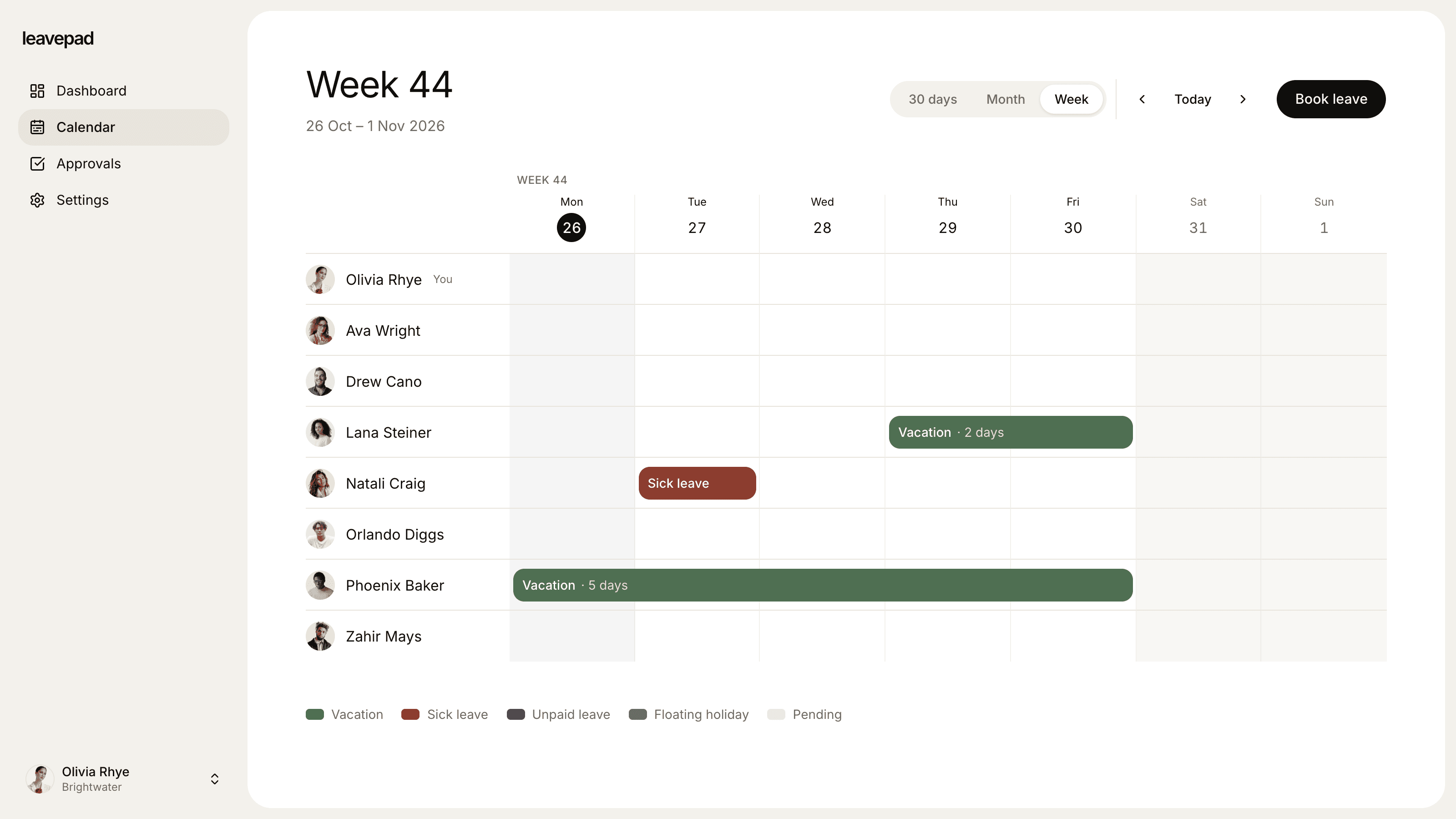
Sound familiar?
Finding out from an auto-reply
You only learn someone is away when their out of office bounces back, after the meeting invite has already gone out.
Leave tracked, travel not
Vacation is in the leave system, but business trips, conferences and training days are in personal calendars nobody else can see.
Standups start with a roll call
Every morning begins with "is Sam in today?", because there's no single place that shows who's out.
Who's out today
Today's absences, at a glance
The team calendar opens on today, with everyone who's out and the days they're away. Check it before a standup, before you book a meeting, or before you promise a client a call.
- Who's out today and over the next 30 days
- See at a glance when each person is back
- Pending time off shown too
More than leave
Business trips, conferences and training, too
Add types for every reason someone can be out of the office, not just vacation. Work trips, conferences and training days can be auto-approved with no allowance, so they're recorded on the calendar without a manager having to sign off.
- Any type of out of office time
- Auto-approve the ones that don't need sign-off
- No allowance where there's nothing to count
Keep it complete
Add someone's time out of office for them
Managers can add a trip or a training day for their team, and admins for anyone, so the calendar stays complete even for people who'd never update it themselves.
- Managers add time out for their team
- Approved straight away
- Shows on the calendar immediately
More from the out of office calendar
Week, month or 30 days
See this week day by day, or the month ahead, to plan meetings and cover.
Book from the calendar
Request time out of office from the calendar page, with the team's plans in view.
Time zones and holidays
Set your company time zone and import public holidays, so a holiday shows as the whole team being out.
Only what people need
Colleagues see who's out and the type of leave. Sickness notes and balances stay private.
Leave tracked properly
Vacation and sick days come off the right balance, so your out of office calendar is your leave record too.
The whole company
One calendar for every team, so people in other departments can see who's available too.
What Leavepad replaces
One out of office calendar for the whole team, instead of auto-replies, status messages and a whiteboard by the door.
- Out of office calendarFinding out from an auto-reply
- Who's out todayA roll call at standup
- Business tripsEvents in personal calendars
- Conferences and trainingA message in the team channel
- Sick daysA text to one manager
- In and out boardA whiteboard by the door
Guide
How to keep track of who's out of office
Knowing who's out is only useful if it's complete and in one place. These habits keep an out of office calendar accurate without anyone having to police it.
- 1
Record every reason someone is out
Vacation and sickness are the obvious ones, but work trips, conferences, training and client days on site matter just as much to the people trying to reach them. Give each its own type.
- 2
Only ask for approval where it matters
Vacation needs a manager's yes. A conference someone's already been sent to doesn't. Auto-approve those types, so recording them takes seconds and people actually do it.
- 3
Check the calendar before you schedule
Make it a habit to look at who's out before booking a meeting, a launch or a client call. It's quicker than reading five auto-replies afterwards.
- 4
Keep the out of office message too
The calendar tells your team; an email auto-reply tells everyone else. Ask people to set one with their return date and who to contact instead.
- 5
Start the day with it
Open the day's standup or team meeting with a quick look at who's out today and who's back tomorrow. Nobody has to ask, and cover is sorted early.
Free scheduling tools
Business Days Calculator
Count the working days between two dates, or add business days to a date, skipping weekends and US federal holidays.
Open the calculatorAbsence Rate Calculator
Work out your team's absenteeism rate, the days lost per employee and the pay cost of unplanned absence, by days or hours.
Open the calculatorPublic Holidays 2027
Every public and bank holiday in 2027 for over 200 countries, with weekdays, regional holidays and long weekends.
See the holidays
Out of office calendar: FAQ
What is an out of office calendar?
+
An out of office calendar is a shared view of when team members are away from work, whether on vacation, off sick, travelling or at an event. It lets colleagues see who's available before they schedule a meeting or send a request.
How do I see who's out of office today?
+
Open Leavepad's team calendar. It starts on today, so everyone who's out is right there with the type of leave and how long they're away, and you can switch to a week or month view.
Can I track business trips and training, not just leave?
+
Yes. Create a type for each one, such as business trip, conference or training, with no allowance and approval turned off. They're recorded on the calendar without affecting anyone's leave balance.
Does it sync with Outlook or Google Calendar?
+
Not yet. Leavepad's calendar is its own shared calendar, built from leave requests, so it's always complete. Ask people to keep setting an email auto-reply for contacts outside the team.
Is an out of office calendar the same as a leave calendar?
+
They overlap. A leave calendar shows time off. An out of office calendar also shows time people are working but not available, like work trips and training. Leavepad does both, because every reason someone is out is just another type.
Can everyone see why someone is out?
+
Everyone sees the type, such as vacation or business trip. Notes, like the reason for a sick day, are only visible to the employee, their manager and admins.
Does it work for remote teams?
+
Yes. It's in the browser, so everyone sees the same out of office calendar from home, the office or on the road, in your company's time zone.
More ways to use Leavepad
Team leave calendar
One shared calendar of who's off and when, kept up to date by every approved request.
Learn moreVacation calendar
A shared employee vacation calendar that makes peak-season scheduling fair and visible.
Learn moreTime off tracker
Vacation, sick days, bereavement and jury duty, each tracked by its own rules.
Learn more
Built for every kind of team
Small businesses
A staff holiday tracker that handles allowances and public holidays without an HR department.
Agencies
Plan project staffing around annual leave and see clashes before a deadline does.
Accounting firms
Keep the team in the office through busy season and spread holidays across the quiet months.
Remote teams
One team leave calendar across time zones, so nobody is surprised by an empty chat channel.
Four-day week companies
Count leave in your working days, not someone else's, with no manual conversions.
See who's out, before you ask
Set up Leavepad for your team in a few minutes. Invite your people and they can book time off today.
Get started