Time off tracker for employees
Every kind of time off, tracked its own way
Vacation isn't the only time people are away. Leavepad's time off tracker handles sick time, floating holidays, bereavement leave, jury duty and parental leave too, each with its own allowance and approval rule, so every absence is on record.
Get started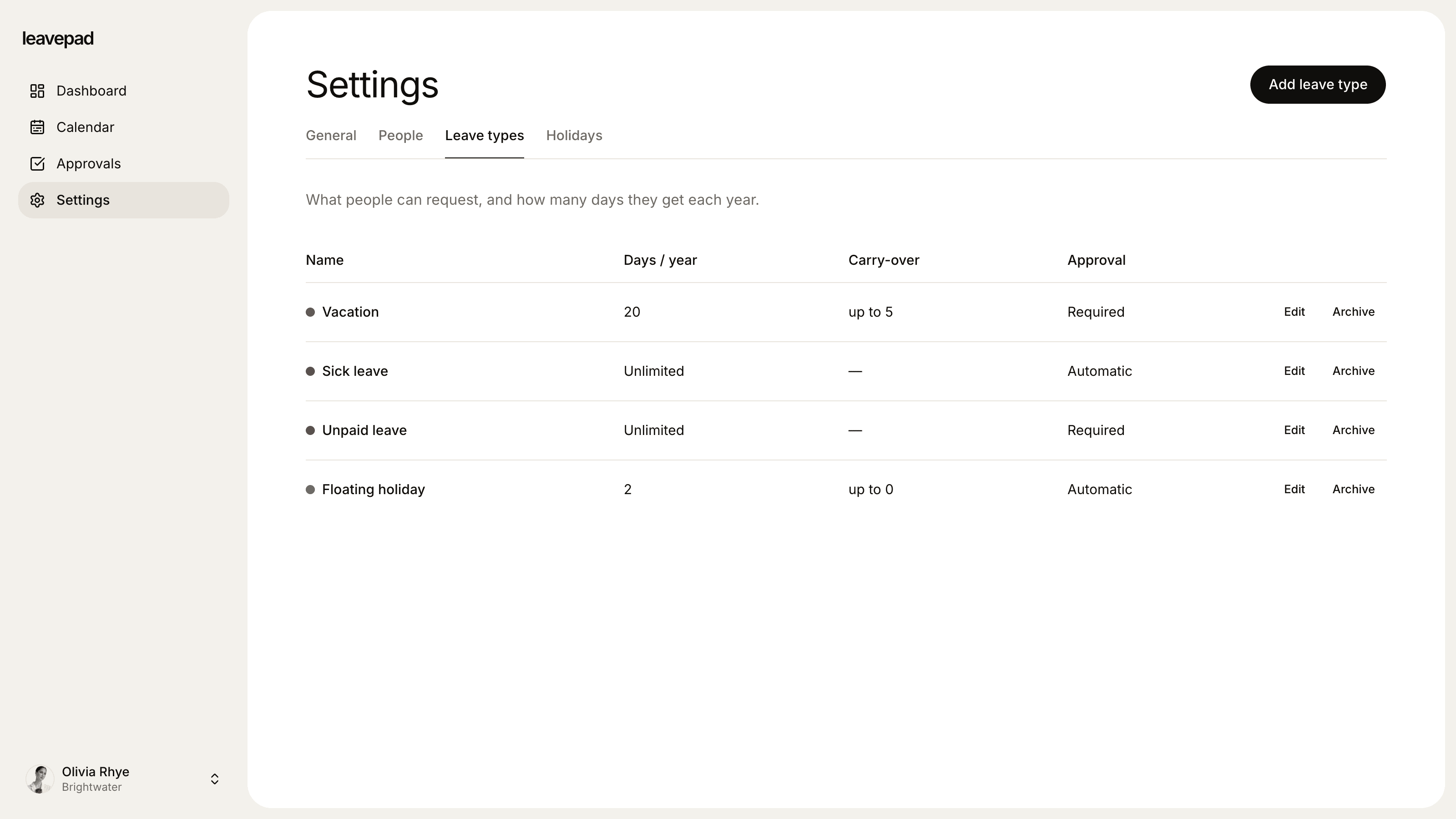
Sound familiar?
Only vacation gets tracked
Vacation days are in the spreadsheet, but sick days, jury duty and bereavement leave live in emails, if they're written down at all.
One rule for every kind of leave
A sick day shouldn't wait for approval like a two-week trip, but with one form for everything, it does.
No record when you need one
When someone asks how many sick days they've used, or HR needs to check a state requirement, nobody can answer quickly.
Time off types
A separate balance for each kind of time off
Create a time off type for each kind of absence your policy covers. Vacation can have 15 days, sick time 5, floating holidays 2 and jury duty no limit at all. Each one is counted on its own, so a sick week never eats into someone's vacation.
- Vacation, sick, floating, bereavement, jury duty and more
- An allowance in days, or no limit
- Each type in its own colour on the calendar
Time off balances
Employees see exactly what they have left
Every employee has a dashboard with a balance for each time off type, updated the moment a request is approved. No more asking HR how many sick days are left, or digging through last year's emails.
- A live balance for every time off type
- Upcoming time off listed on the dashboard
- Only working days are taken off a balance
Time off approvals
Approve what needs approving, nothing more
Choose for each type whether a manager needs to approve it. A long vacation goes to the manager's approval list, while jury duty or training can be approved automatically and still show on the calendar.
- Approval on or off for each time off type
- Approve or decline with a note in one click
- Every decision recorded on the request
More from the time off tracker
Log time off for others
Managers can record a sick day or jury duty for their team, and admins for anyone. It's approved straight away.
US federal holidays built in
Import federal holidays for any year in one click, plus your own days off like the day after Thanksgiving.
Unlimited types, tracked too
Leave types with no limit still record every day taken, so you can see patterns without a cap.
Carry-over per type
Let a few vacation days roll into next year while sick time and floating holidays reset to zero.
Cancel and rebook
Employees can cancel a pending or upcoming request themselves, and the days go straight back to their balance.
Overlaps caught
Someone can't book vacation on days they already have off, so no day is ever counted twice.
What Leavepad replaces
One time off tracker for every kind of absence, instead of a vacation spreadsheet plus a separate note for everything else.
- Sick time recordsA note in the manager's calendar
- Jury duty and bereavementAn email to HR, if anyone remembers
- Vacation balancesA spreadsheet tab per employee
- Floating holidaysTrusting people to keep count
- Approval rulesOne form for every kind of request
- Who's offChecking three different places
Guide
The types of time off to track, and how
A good time off tracker records every kind of absence, not just vacation. In the US most of these are set by your own policy, but some have state or federal rules. Here's how to set each one up.
- 1
Vacation
No federal law requires paid vacation, so the allowance is yours to set. Decide how many days people get, whether they're granted up front or accrued, and how many can carry over. In some states, such as California, earned vacation can't be forfeited.
- 2
Sick time
Many states and cities require paid sick leave. California, for example, requires at least 40 hours or five days a year. Track sick time separately from vacation so you can show you meet the local minimum, and don't make it wait for approval.
- 3
Floating holidays
Floating holidays let people take days that matter to them, such as a religious or cultural holiday. Give them a small allowance of their own, usually one to three days, and reset it each year.
- 4
Bereavement leave
There's no federal requirement, but some states set one: California requires up to five days of bereavement leave. Set a type with your policy's allowance, and let managers book it for someone who shouldn't have to fill in a form.
- 5
Jury duty and parental leave
Federal law protects employees' jobs during federal jury service, and FMLA gives eligible employees up to 12 weeks of unpaid, job-protected leave. Give both types no limit, so every day is recorded without a cap getting in the way.
Free time off calculators
PTO Accrual Calculator
Work out how much paid time off is earned each pay period, and project a PTO balance to any date with caps and carryover.
Open the calculatorPTO Payout Calculator
Work out what unused vacation is worth when an employee leaves, from an hourly rate or salary, with estimated taxes.
Open the calculatorAbsence Rate Calculator
Work out your team's absenteeism rate, the days lost per employee and the pay cost of unplanned absence, by days or hours.
Open the calculator
Time off tracker for employees: FAQ
What is a time off tracker?
+
A time off tracker records each employee's time away from work: what they're entitled to, what they've requested and taken, and what's left. A good one tracks every kind of time off separately, from vacation and sick time to bereavement leave and jury duty.
What's the difference between a time off tracker and a PTO tracker?
+
A PTO tracker usually focuses on one bank of paid time off. A time off tracker covers every kind of absence, paid or unpaid, each with its own allowance and rules. Leavepad works either way: run one PTO type, or a separate type for each kind of time off.
Can I track sick time separately from vacation?
+
Yes. Sick time is its own type with its own allowance, so a week off sick never comes out of someone's vacation. You can also let sick time skip approval, while it still shows on the team calendar.
Does it work for hourly employees?
+
Leavepad tracks time off in days, counting only the days in your working week. If you track hourly accruals, use our free PTO accrual calculator to work out each person's balance in days and adjust it to match.
Can managers log time off for their team?
+
Yes. Managers can book time off for their direct reports, and admins for anyone. Time off booked this way is approved straight away, which is useful for sick days and bereavement leave.
Are federal holidays counted as time off?
+
No. Import US federal holidays for the year and they're skipped when time off is counted. A week off over Thanksgiving costs four days, not five.
Can employees cancel time off?
+
Yes. Employees can cancel a request that's still pending, or an approved one that hasn't started yet, and the days go back to their balance straight away.
More ways to use Leavepad
PTO tracker
Time off requests, one-click approvals and PTO balances that update themselves.
Learn moreVacation calendar
A shared employee vacation calendar that makes peak-season scheduling fair and visible.
Learn moreLeave management system
Leave policies, approvals, balances and the team calendar in one leave management system.
Learn more
Built for every kind of team
Small businesses
A staff holiday tracker that handles allowances and public holidays without an HR department.
Agencies
Plan project staffing around annual leave and see clashes before a deadline does.
Accounting firms
Keep the team in the office through busy season and spread holidays across the quiet months.
Remote teams
One team leave calendar across time zones, so nobody is surprised by an empty chat channel.
Four-day week companies
Count leave in your working days, not someone else's, with no manual conversions.
Track every kind of time off
Set up Leavepad for your team in a few minutes. Invite your people and they can book time off today.
Get started